
Case Study

Digital Accountant

A real-world OpenClaw deployment in a small business accounting firm
Back to technical article

Case Study Visual

OpenClaw is the "it" tool for automation right now. But if you follow the AI space, you've likely heard the warnings: "Don't use it in production." "It's too risky for sensitive data." "An autonomous agent could wipe your database in seconds."

For a small accounting firm handling sensitive financial data, these aren't just theoretical risks - they are deal-breakers. However, the productivity promise of AI agents is too great to ignore. We decided to bridge the gap.

Here is the safety-first blueprint we used to turn OpenClaw from a "risk" into a productivity engine.

The Blueprint

The Blueprint for a Safe AI Deployment

Before we automated a single form, we had to solve the three biggest hurdles of AI agent deployment.

1. Preventing Sensitive Data Leaks

The Risk: Prompt injection could leak sensitive client data.

The Solution: We went "air-gapped."

  • Private Interface: We don't allow any external connection to OpenClaw. A locally-hosted Rocket.Chat with openclaw-rocketchat plugin is used as our private interface and accessible only via our intranet.
  • Local Inference: All LLM (Qwen3.5–27B) processing happens on our local hardware. No data ever leaves our firm.

2. Stopping Rogue Agent Behavior

The Risk: You may have heard stories of an OpenClaw agent deleting all of a user's emails, or you might worry about a rogue agent wiping out your disk. You cannot rely on a system prompt alone to prevent disaster.

The Solution: Fine-Grained Access Control (FGAC).

We don't rely on the AI "obeying" instructions. We use the OpenClaw Fine-Grained Access Control Plugin to strip dangerous privileges at the tool call layer. It can fully control what exactly an agent can and cannot do.

3. Managing AI Errors and Hallucinations

The Risk: AI makes up numbers. In accounting, "almost right" is catastrophic.

The Solution: Verification Models + Human-in-the-Loop.

We use a dual-model approach: one model for generation and a second, more analytical model for verification. Most importantly, a human remains "in the loop" for almost all automated tasks, reviewing actions before they are finalized.
Use Cases

Real-World Use Cases: Where OpenClaw Shines

1. Intelligent Email Triage

Managing a shared info@xxxCPA.com inbox is a massive time sink. We use the gog plugin so OpenClaw can read queries and draft contextual replies.

The Safety Catch: Using our FGAC plugin, we can reliably allow the agent to create drafts but never to send them.

Draft Policy
{
  "type": "grant",
  "toolName": ["exec"],
  "sessionKey": ["agent:main:rocketchat:direct:xxxxx",...],
  "condition": "params.command like 'gog gmail drafts create*' or ...",
  "desc": "Allow draft email"
}

We also grant read/write access to a dedicated working folder so the agent can save attachments from emails or chats:

...
"condition": "path(params.file_path) = '/mnt/z/openclaw/workspace/work' or path(params.path) = '/mnt/z/openclaw/workspace/work'"
...

2. The Interactive Knowledge Base

For years we have documented how to use UltraTax and Drake Accounting to handle many corner cases, along with new joiner onboarding materials. These documents are now part of the knowledge base for OpenClaw. This saves us a significant amount of time when training new joiners.

3. Payroll Automation

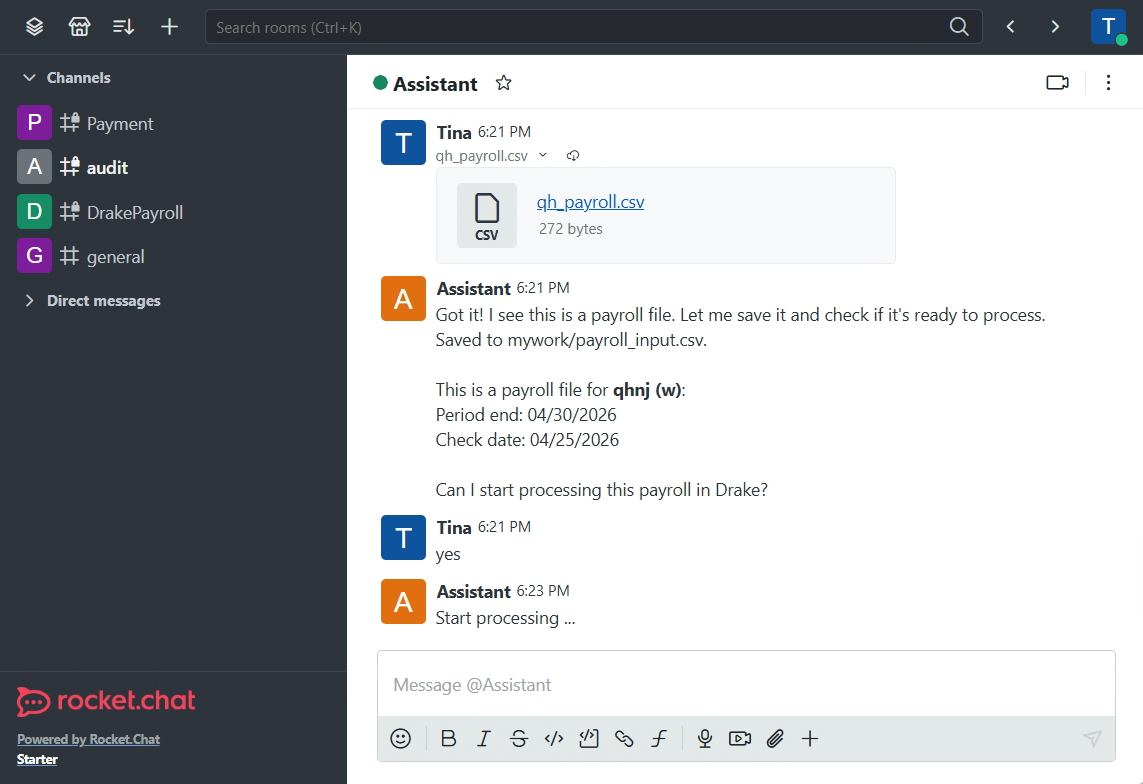
Drake Accounting is powerful but lacks an API for payroll data. It supports CSV importing for many screens, but not for payroll data.

Rocket.Chat Integration

Our Workflow:

  • 1 Generation: OpenClaw generates a CSV from raw client data: PDFs, Excel spreadsheets, emails, etc.
  • 2 Import: When importing is available, a human imports the CSV and verifies it in Drake's production environment.
  • 3 Script: For payroll data input, we had to build a Python script using pywinauto and pyautogui to key them in from the UI. The script does the following:
    • Clone the specific client data from PROD env to a Sandbox environment.
    • Launch Drake in the sandbox environment, log in with MFA, select client, and use UI automation to "key in" the data.
    • Export a backup of the result for the client.
  • 4 At the end, a human restores the client data to PROD and performs a final check.

4. Reporting and Document Generation

Generating client PDF reports used to involve manual merging, image scaling, and layout adjustments. We've turned these into scripts + OpenClaw skills. Now, the agent handles the entire pipeline - no more manual PDF surgery or image combination.

5. Tax Preparation

The firm uses Thomson Reuters' UltraTax for tax preparation.

We didn't tackle much during the busy 2026 tax season, but we did test using a script to key in several forms in the data entry app. The real challenge is extracting data from PDFs and images - a PDF library + OCR + LLM combination can do some of the work, but processing a 100+ page consolidated 1099 remains a challenge.

As AI models improve, we expect the accuracy to follow. Ideally, application vendors will provide APIs to input form data directly.

"Here's hoping that next year, we no longer have to work 12 hours a day, 7 days a week in the busy tax season."

Back to Technical Deep-Dive